


Flumotion Smart Multi CDN provides consistent security services at the edge. These services are managed through the Flumotion Smart Multi CDN console and include:
- Managed WAF – Choose between:
- Flumotion Smart Multi CDN WAF – Pre-configured security rulesets that protect against common web threats. It provides out-of-the-box protection against vulnerabilities such as SQL injection, XSS, and known attack patterns, reducing the need for manual rule creation and ongoing maintenance.
- Check Point Machine-Learning WAF – A next-generation, ML-based Web Application and API Protection (WAAP) service that automatically distinguishes between legitimate and malicious traffic. It provides protection against suspicious activity, API abuse, bot traffic, and zero-day attacks with minimal manual tuning.
- Check Point Rule-based WAF – A rule-based security engine that identifies and prevents suspicious activity based on predefined rules, providing protection against threats such as the OWASP Top 10.
- Custom Rules – Allow you to define specific conditions and actions to inspect and control incoming web traffic.
- Rate Limiting – Controls the number of requests a client or IP address can make to your application within a specified time window. It helps protect against abuse, credential stuffing, DDoS attacks, and excessive API calls by automatically throttling or blocking traffic that exceeds the defined limits.
- Bot Management – Provides intelligent protection against automated bot traffic, helping ensure that only legitimate human users can access your content and APIs.
- Bot Prevention – Prevents bots from accessing specific pages on your website or performing actions within your web application.
- Bot Visibility – Identifies well-known bots, including verified bots, and similar automated traffic accessing your website.
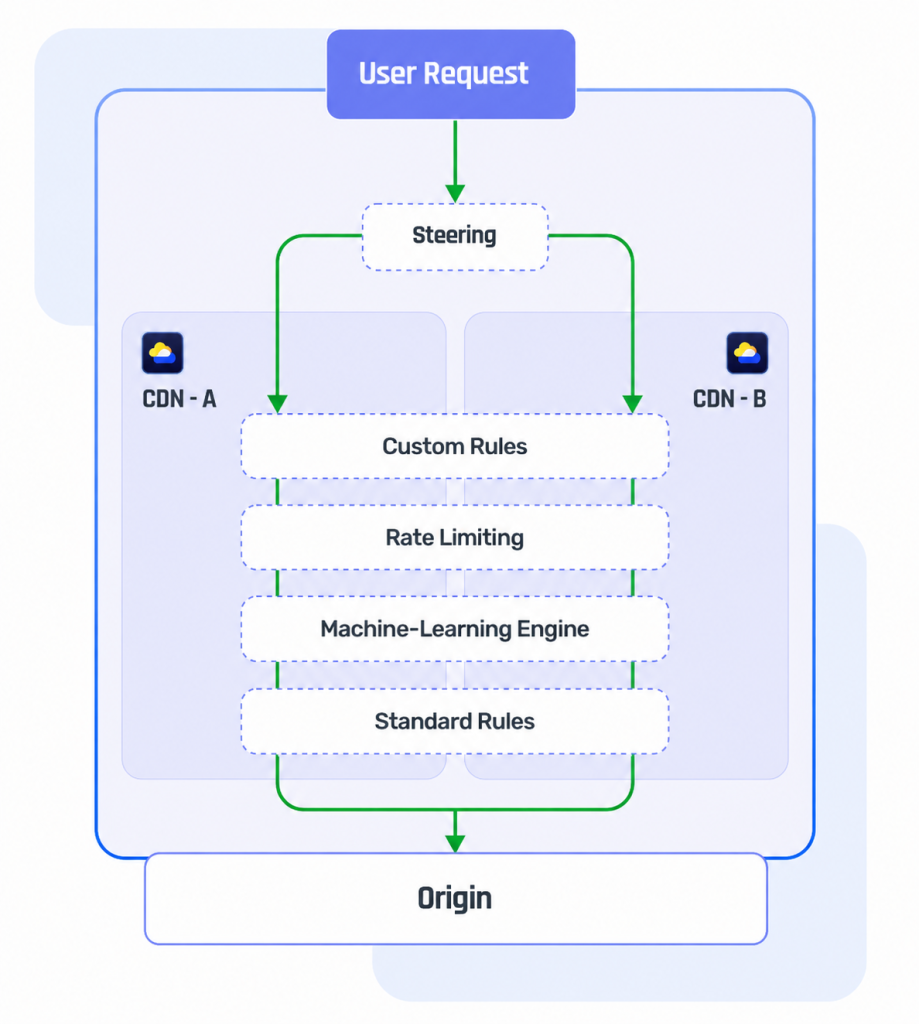
Security services are executed in the following order:
- Custom Rules, including Bot Prevention.
- Rate Limiting.
- Machine-Learning WAF.
- Managed WAF (standard rules).
Enabling Security Services #
Security services are disabled by default for new services. You can enable them at the service level through the Flumotion Smart Multi CDN console.
Please note that Flumotion Smart Multi CDN security services use edge compute, which may incur additional costs from your CDN provider.
To enable security services for your service:
- Navigate to your service.
- In the sidebar, select Security, then select WAF.
- Click Enable Edge Security.
Note: Security services must be enabled for your account before they can be enabled for a service. You can contact us at support@flumotion.com to enable this feature.