


Flumotion Smart Multi CDN and Check Point #
Flumotion Smart Multi CDN and Check Point work together to deliver an AI-powered WAF at the edge, providing consistent, enterprise-grade security across multiple CDNs.
The Check Point-powered WAF leverages machine learning and behavioral analysis to detect and block both known and zero-day web attacks, providing continuous protection with minimal latency and manual rule tuning.
Key Capabilities #
Key capabilities include:
- Automated Application & API Protection – An AI-based platform that automatically distinguishes between legitimate and malicious traffic. It provides protection against suspicious activity, API abuse, bot traffic, and zero-day attacks with minimal manual tuning.
- Consistent Multi-CDN Security – Identical policies and protections are enforced across multiple CDNs, helping eliminate inconsistent security behavior between providers.
- Centralized Management – Security rules and configurations are managed through a single Flumotion Smart Multi CDN console and applied consistently across edge locations.
- Scalable Edge Deployment – Protection runs at the CDN edge, stopping threats close to their source while minimizing latency.
- Threat Intelligence – Powered by Check Point’s global ThreatCloud to detect and block emerging attacks.
With the Flumotion Smart Multi CDN and Check Point-powered WAF, customers benefit from unified, enterprise-grade security at the edge without sacrificing performance or flexibility in their multi-CDN strategy.
What Is Check Point-Powered WAF? #
Check Point-powered WAF is an ML-based Web Application and API Protection (WAAP) solution. It is designed to secure modern applications and APIs running in the cloud, on Kubernetes, or on-premises.
Unlike traditional WAFs that rely heavily on manual rule tuning, it uses AI and behavioral analysis to automatically detect and block attacks while minimizing false positives.
In addition to static signatures used by traditional WAFs, Check Point-powered WAF uses adaptive machine learning models:
- Request Classification – Each incoming request is parsed, including its method, headers, cookies, body, and payload structure.
- Behavioral Analysis – Request patterns are compared against the application’s learned normal behavior.
- Contextual Decision-Making – Request history, API schemas, and traffic baselines are taken into account to reduce false positives.
- Automatic Learning – As applications evolve with new endpoints and parameters, the models adapt without requiring manual reconfiguration.
ML-Based WAF Method of Operation #
Check Point-powered WAF uses three phases to accurately identify malicious activity while minimizing false positives. This process provides real-time protection against both known and unknown zero-day attacks.
Phase 1 – Payload Decoding #
Effective machine learning requires a deep understanding of the underlying application protocols, which continuously evolve.
The engine analyzes all relevant fields of the HTTP request, including URLs and HTTP headers, as well as JSON/XML data extraction and payload normalization, such as Base64 and other encoding formats. A set of parsers covering common protocols feeds the relevant data into Phase 2.
For example, some Log4Shell exploit attempts used Base64 and escape encoding techniques to obfuscate payloads and bypass traditional detection mechanisms.
Phase 2 – Attack Indicators #
Following parsing and normalization, the network payload is processed by a high-performance engine that searches for attack indicators.
An attack indicator is a pattern associated with the exploitation of vulnerabilities from different attack families. These attack patterns are derived through ongoing offline supervised learning using a large number of payloads.
Each pattern is assigned a score based on the likelihood that it is benign or malicious. This score represents the confidence level that the pattern is part of an attack. Because combinations of patterns can provide stronger indications of malicious activity, scores are also calculated for combinations of indicators.
For example, in the case of Log4Shell and Spring4Shell attacks, Check Point-powered WAF used several indicators from the Command Injection, Remote Code Execution, and Probing families. These indicators produced a high confidence score that the payload was malicious.
To improve accuracy and reduce false positives, the engine then proceeds to the third and final phase.
Phase 3 – Contextual Evaluation Engine #
The contextual evaluation engine uses machine learning techniques to determine whether a payload is malicious within the context of a specific customer environment, user, URL, and field.
These factors are evaluated through a weighted function that generates a confidence score. If the score exceeds the configured threshold, the request is blocked.
The engine considers the following factors:
Reputation Factor #
For each request, the request originator is assigned a score based on their reputation and previous requests. This score is normalized and used to increase or decrease the overall confidence score.
Application Awareness #
Modern applications often allow users to modify web pages, upload scripts, use advanced query syntax, and perform other complex operations.
Without application awareness, legitimate activity of this kind could potentially be identified as malicious. Machine learning is therefore used to analyze and establish a baseline for the application’s normal behavior.
Learn User Input Format #
The system can identify specific user input types that are known to cause false detections and use machine learning to adjust the detection process, allowing legitimate behavior without compromising attack detection.
False Detection Factor #
If inconsistencies are identified in the detection process, an additional factor is applied to the confidence score based on the reputation associated with the relevant detection location.
Supervised Learning Module #
An optional supervised learning module presents payloads to administrators and asks them to classify the activity, helping accelerate the learning process.
ML-Based WAF Lifecycle and Configuration #
Learning Level #
Throughout its lifecycle, the engine indicates its maturity and readiness for prevention through a Learning Level, ranging from Kindergarten to PHD.
At lower learning levels, the engine does not block traffic. Instead, it identifies outliers and generates Tuning Suggestions based on specific HTTP requests.
You can provide feedback indicating whether these requests are Legitimate or Malicious. You can also help the engine distinguish legitimate requests from threats by providing a list of Trusted Sources whose activity can be considered legitimate.
The engine provides recommendations when it determines that it is ready to start preventing requests identified as malicious:
| Recommendation | Action Required |
| Keep Learning | No action required – the machine learning model requires additional HTTP requests and more learning time. |
| Review Tuning Suggestions | The learning mechanism has generated tuning suggestions. See the details below. |
| Prevent Critical Severity Events | The system is ready to prevent critical-severity events. |
| Prevent High Severity And Above Events | The system is ready to prevent high-severity and critical-severity events. |
You can view the Learning Level and Recommendations in the Learn sub-tab of the Check Point tab on the WAF page.
Trusted Sources #
You can help the ML-based engine identify legitimate traffic by providing a list of Trusted Sources. This can significantly reduce the number of false-positive indicators.
Configure Trusted Sources in the Learn sub-tab of the Check Point tab on the WAF page.
You can configure Minimum Users To Trust, which defaults to 3. This value can be set lower, although this is not recommended, or increased as required.
For example, with a value of 3, the engine will not learn that a behavior is benign based on Trusted Sources until at least three of them have generated similar traffic patterns. This prevents a single source from becoming a potentially malicious «source of truth.»
The number of Trusted Sources in the table must therefore be at least equal to the configured minimum, allowing the machine learning engine to establish a reliable indication of benign behavior.
Tuning Suggestions #
When the ML-based engine identifies enough suspicious requests and can compare them against legitimate traffic, it can generate a Tuning Suggestion.
Providing feedback on these suggestions is not mandatory, as the engine can learn automatically. However, providing feedback can help the machine learning engine reach a higher maturity level and improve its accuracy more quickly through human guidance.
Tuning Suggestions are available in the Learn sub-tab of the Check Point tab on the WAF page:
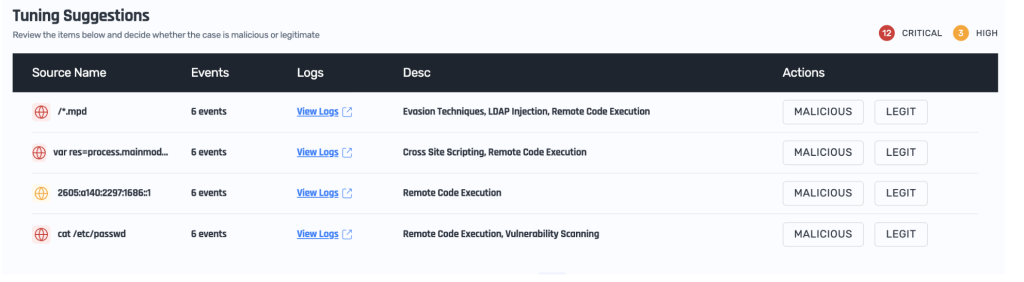
The table provides basic information about the identified suspicious activity. You can view the associated HTTP requests by clicking View Logs and navigating to the Sampled Logs table:
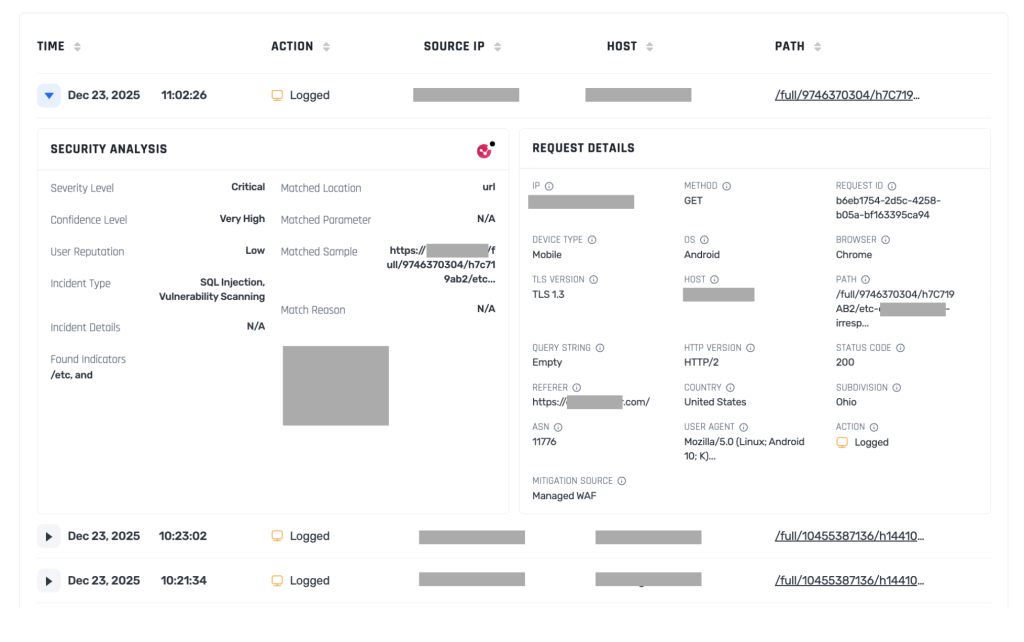
For each Tuning Suggestion, you can indicate whether the activity is legitimate or malicious. Your decisions are recorded in the Tuning Decisions table, where you can review previous decisions and undo them if necessary.
Configuring the Engine #
You can configure the ML-based engine in the Configure sub-tab of the Check Point tab.
You can set the engine Mode to:
- Learn – The initial mode. The engine analyzes traffic but does not block requests.
- Prevent – The engine blocks traffic based on past activity, its learning process, and tuning information.
- Disabled – Completely disables the ML-based engine.
Once the engine is set to Prevent mode, you can specify which activity should be blocked by configuring the Confidence Threshold Level:
- Critical – Blocks only requests flagged as critical threats.
- High – Blocks requests flagged as high or critical threats.
- Medium – Blocks all requests flagged as threats.
Set the confidence level according to the recommendations provided by the engine.
Performance and Efficiency #
HTTP requests can contain large amounts of data. To prevent excessive CPU and resource consumption, the ML-based engine scans only the first 64 KB of the HTTP request body.
You can configure the engine to prevent requests with bodies larger than 64 KB by enabling Block Large Requests.